Vis1
VIS Landscape
InfoVis
Bridging humans and data, 여러 분야의 교집합
- HCI: Human users
- Computer Graphics: Millions of visual elements
- Machine Learning: Abstracted numbers into bigger patterns
- Databases: User’s visualization query targets large-scale data
- Cognitive Science: Which visual representation is effective
- Statistics: Data aggregation
6 Area Model
시각화 연구를 6가지 영역으로 분류한 체계
Area 1: Theoretical & Empirical
시각화의 이론적 기초와 실험적 검증
Area 2: Applications
시각화 도구
Area 3: Systems & Rendering
시각화 rendering을 위한 system & algorithm
Area 4: Representations & Interaction
데이터 표현 방법 및 상호작용 방법
Area 5: Data Transformations
데이터를 시각화하기 적합한 형태로 변환
Area 6: Analytics & Decisions
시각화를 통해 의가결정 돕기
InfoVis에서는 Domain, Users, Goal을 정의하는게 중요하다.
View Description
Visual system에서는 다음 세 가지를 담는다
Encoding : 무슨 visual mapping을 사용했는가
Interaction : 어떤 상호작용이 가능한가
Justification : 왜 특정 encoding 및 interaction 조합을 선택했는가
Usage example : 어떻게 사용하는가
Evaluations with Humans
Visualization이 제공되는 대상은 사람이기 때문에 사람에 의한 검증이 필요하다
User study
10명보다 많은 non-expert가 usability test
Case study
few experts가 designer들의 설명을 들으면서 전체적인 workflow 평가
Deployment study
실제 deploy하여 10명보다 많은 non-expert가 평가
Early Visualization Approaches
GUI (MFC) : hard to learn, limited audience $\downarrow$ Spreadsheet program (Excel): $\downarrow$ Business Intelligence Solutions (Spotfire, Tableau) $\downarrow$ Web browsers: but limited $\downarrow$ AI
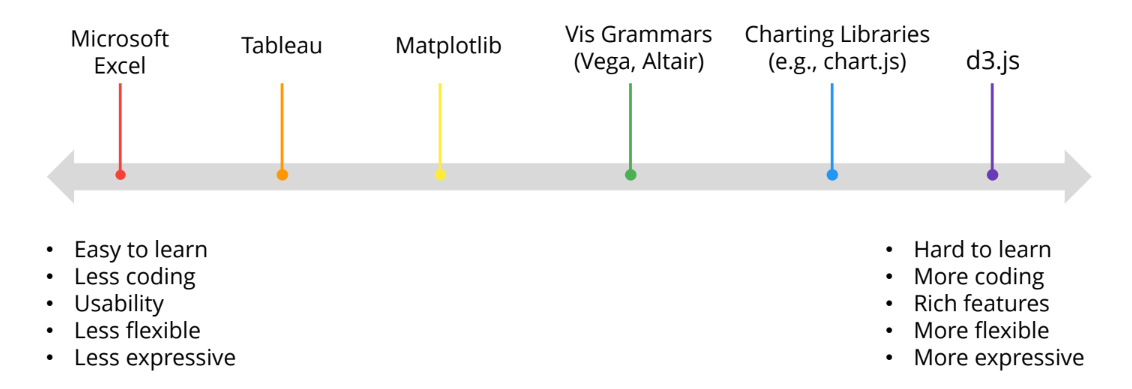
Drawing Visualizations Comparison
Top down: 이미 정해진 chart type과 map attribute. 즉, 이미 정해진 template들 기반
Excel , Spotfire, Chart libraries Familiar, not expressive
Bottom up: Mark와 channel을 먼저 고르는 것
Tableau, Visualization Grammar, d3.js Aligned with research leanrning curve
Top down
General Spreadsheet Software (Excel, 한글)
- Pros
- Easy to learn
- Familiar
- No code
- Cons
- Limited expressiveness
- not aligned with InfoVis theory
- Less customizable
Reusable Chart Libraries
- Pros
- custamizable
- web framework에 가능
- Cons
- Coding required
- Not aligned with InfoViz
Notebook based Solution
- Pros
- 3D visualization
- Easily integrated
- Cons
- Less expressive
- Not interactive
- Not aligned with InfoViz
- Static
Bottom up
Tableau
- Pros
- Familiar interface
- expressive
- well aligned with theory
- Cons
- Learning curve
- Customizable but limited
Imperative programming: How the program should do something: 어떻게 보여줄 것인가를 설명해야 함 Declarative programming: What the program should do: 무엇을 보여줄 것인가를 설명해야 함 $\rightarrow$ 더 좋음
Visualization Grammars
- Pros
- Declarative language
- Aligned
- Interactive and customizable
- Cons
- Coding
- Knowledge needed
GenAI tools
- Pros
- No knowledge needed
- no coding
- customizable
- Cons
- Often not specialized
- limited to narrow scope of chart and interactions
d3.js
- Pros
- Highest customizability
- Well aligned
- Scalable
- Well maintained
- Cons
- Steepest learning curve
- Coding required
- stubborn